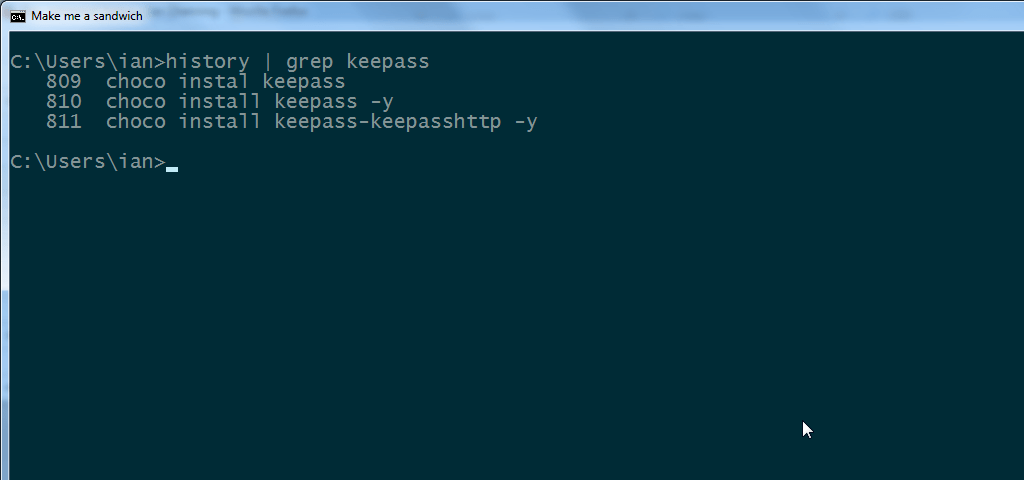
One of the nice things of Linux is the command history – it stores typically the last 1000 commands or so and its saved every time you log out.
DOS does have this through the doskey /history command (but only for current session) and you can relatively easily append this to a file:
This file contains hidden or bidirectional Unicode text that may be interpreted or compiled differently than what appears below. To review, open the file in an editor that reveals hidden Unicode characters.
Learn more about bidirectional Unicode characters
| doskey /history >> %USERPROFILE%\history.txt% |
The tricky bit is having this done for you on log out.
Via a Stack Overflow question on bash_history you can get close, using doskey macros which appends to a file on exit.
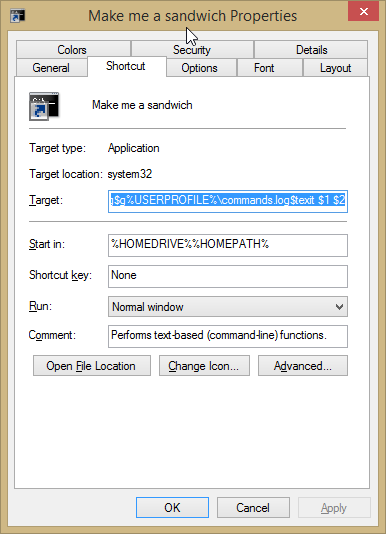
This only works for the current session though so you need to create a shortcut that runs the command each time with the following Target:
This file contains hidden or bidirectional Unicode text that may be interpreted or compiled differently than what appears below. To review, open the file in an editor that reveals hidden Unicode characters.
Learn more about bidirectional Unicode characters
| %windir%\system32\cmd.exe /K doskey exit=doskey/history$g$g%USERPROFILE%\history.log$texit $1 $2 |
Then you just have to remember to type exit each time…
Update
I also found three useful commands – but they’re only for your current session. Hat tip to Nifty Computer Tricks:
- F3
- get last command
- F7
- current list (use left/right arrow keys to paste to the command line)
- F8
- auto-complete (type the first few letters)
Update 2 – Some extra love for the DOS prompt…
If you’ve got this working then I’ve added some extra basics. First you need to install Git (and I suggest you do it using the Chocolatey package). This includes the best versions of gnu commands compiled natively for Windows.
Add the Git usr bin directory to the path e.g. C:\Program Files\Git\usr\bin.
Then download my !.bat / history.bat gist:
Put the !.bat and history.bat into the Git usr bin directory too. These assume you are saving the history to %USERPROFILE%\history.log.
Then you’ll be able to do commands like history | grep mysql to list all your mysql commands in history.log with their line numbers. Then call ! 123 to execute the specific line of the history.log file.
Update 3 – Clink love
Martin Ridgers’ Clink is an awesome tool to behold. That adds the correct ! command to the DOS command prompt. Buuuuuuut… it doesn’t include a history command. So save the above history.bat file to C:\Windows\System32\history.bat (it doesn’t have to rely on GNU Tools / Git) and uncomment history_file=%localappdata%\clink\.history.
This file contains hidden or bidirectional Unicode text that may be interpreted or compiled differently than what appears below. To review, open the file in an editor that reveals hidden Unicode characters.
Learn more about bidirectional Unicode characters
| @echo off | |
| rem simple replacement for linux ! syntax e.g. !591 | |
| rem usage: ! N (executes line N of history.log) | |
| rem @link https://ianchanning.wordpress.com/2014/10/29/dos-command-history/ | |
| if "%1"=="" goto Syntax | |
| if "%1"=="/?" goto Syntax | |
| for /f "tokens=*" %%x in ('sed -n "%1{p;q}" %USERPROFILE%\history.log') do echo %%x & cmd /c %%x | |
| goto End | |
| :Syntax | |
| echo usage: ! N | |
| :End |
This file contains hidden or bidirectional Unicode text that may be interpreted or compiled differently than what appears below. To review, open the file in an editor that reveals hidden Unicode characters.
Learn more about bidirectional Unicode characters
| @echo off | |
| rem replacement for linux `history` command | |
| rem usage: history | |
| rem @link https://ianchanning.wordpress.com/2014/10/29/dos-command-history/ | |
| set history_file=%USERPROFILE%\history.log | |
| rem For if you are using Martin Ridgers 'clink' | |
| rem @link http://mridgers.github.io/clink/ | |
| rem set history_file=%localappdata%\clink\.history | |
| rem this doesn't require GNU Tools, but doesn't have line numbers | |
| rem type history_file | |
| rem requires GNU Tools installation (e.g. Git SCM) | |
| cat -n %history_file% |
 Ian Channing
Leave a comment